

How Canva's design-specific foundation model unlocks editing of any AI-generated image
 March 16, 2026
- Summary:
- Based on its own proprietary foundation model, a new AI tool from Canva analyzes the visual structure of flat image files and makes them editable.
Have you ever generated an image with AI but felt it's not quite right? Then when you ask the AI to generate a new version, it just adds new problems instead of improving the resulting image. But you can't just go in and edit the first attempt, because it's produced as a flat file with no way to isolate individual elements such as text, objects, people or backgrounds. Visual design platform Canva has just released an innovative new capability that overcomes this obstacle, taking flat-file JPG or PNG images from any source, including popular AI image generators such as ChatGPT, Midjourney and Google's Nano Banana, and separating them into editable layers.
Called Magic Layers, the new feature is driven by Canva's own proprietary foundation model, the Canva Design Model. Rather than rely on general-purpose foundation models from the likes of OpenAI, Anthropic, Google or DeepSeek, Canva has opted to build its own, design-specific model. Stef Corazza, the vendor's Head of AI Research, explains the rationale for its DIY strategy:
Initially, we were using an OpenAI model. We realized it was slow, very expensive. We developed our own model. It's like, two times faster and three times cheaper, because the big players in this world are building very generic, very big models. But design, it's a very specific area, and so if you can fine-tune the model for the specific use case, you're massively outperforming them in quality, speed, and also in cost.
When launched last October as part of Canva's Creative Operating System, this specialization meant that the Canva Design Model is able to produce fully editable content, with awareness of an image's structure, layers, hierarchy, branding, and visual logic. Until now, that has been true of images generated by Canva's own AI, but not images from other systems, which spit out flat-file images in which every element merges into the next as an undifferentiated collection of pixels.
Collaborative editing
Magic Layers changes that. It applies this same awareness to any image, identifying its structure and the relationship between elements, recognizing and separating components such as text, objects and backgrounds into layers, while preserving the original layout. Unlike vector tools that simply trace shapes by converting pixel regions into outlines, it produces a fully editable set of elements that preserve the intent behind the original creation. Magic Layers currently supports single-page .png and .jpg files, but other file types may be added in the future. It began rolling out last week in public beta in the UK, US, Canada and Australia, and will be available in other markets internationally later on.
The initiative to develop this new capability came out of a recognition that designers — especially in a business context — will typically want to edit the output generated by AI, treating AI as a collaborative member of the team rather than as a standalone service. Corazza elaborates:
People sometimes forget that creativity is naturally iterative, and it's not a one-shot exercise. So in Silicon Valley, all the engineers think like, 'Oh, guys, it's gonna be so good. You click one button and then it will create the perfect artwork for you.' In fact, no, we all forget how we recursive that process is, and it's much more of a journey. I think every day we are reminded of that.
And so our approach is a little more humble. We see AI as a workflow-aware collaborator, as opposed to a replacement, and that's why I think also our user base, is reacting a lot more in a favorable way.
So, for example, in exactly the same way that you would at-mention a human collaborator, Canva AI can be invoked by adding a comment to an artwork, and the whole team can see that interaction and follow through on the outcome.
All-in-one file format
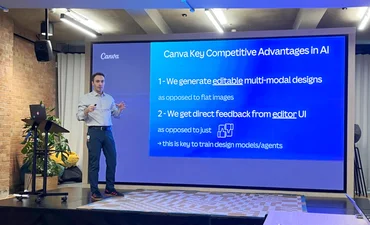
Canva believes its AI model has two unique advantages over other models in the design arena. The first is the Canva platform's all-in-one file format — unlike other design platforms that have separate file formats for vector designs, bitmap images, layouts and other modalities. This means that its AI model doesn't have to navigate multiple different file formats as it trains. Corazza explains:
Normally, every component is a different file. I spent enough time at Adobe to know that they have 25 tools and 25 file formats. Believe me, 80% of the time is spent with importers and exporters [for tools like] Photoshop and InDesign. And the overlap within these tools is sometimes like 50%, they do almost the same thing, but in a slightly different way, and they have different file formats. It's impossible to pull everything together and also to use it for training AI, because if the formats are different, you just can't train an LLM.
Everything that you see on a Canva platform, it's one file format called CDF, and that is one of the biggest advantages of this company in the AI space. We have something that is so perfect to train on across all the media types and all the other types.
The second advantage is the ability to analyze what users do when they edit images, and feeding that knowledge back into the training. He goes on:
Instead of delivering a flat image on a page, we are actually delivering the result of our AI into an editor. When I put it in an editor, the first thing users are going to do, they're like, move the text, adjust it, change the image, remove the background. All these actions that we are recording with our analytics, so we can see every time they ask for something, some design to be created, and we deliver that design to them, they're going to tweak it, and then we're going to learn how they want it. And so we, over time, can apply this thing called reinforcement learning, where we provide an output, we see how they change it, AI learns — and the next time we do it for them.
None of the our competitors, even like the OpenAI and Anthropics of the world, can do that because, again, they don't have an editor. They are delivering just flat images. You can give thumbs up, thumbs down, or you can re-prompt, but you cannot actually modify.
He sums up:
Our key competitive advantage is we generate editable, multimodal designs, all in one editor, and then we get direct feedback from our users, from that editor.
Enterprise adoption
Another distinctive aspect of Canva's approach, he argues, is its inclusion of AI in the collaboration workflow, facilitated by the single file format:
We have built collaboration and AI from the get-go. I think collaboration forms the strongest aspect of Canva, and so we see AI as a collaborator, and then from day one, with a collaboration platform sitting on top of AI — which is now what all the other companies are trying to retrofit — but it's not that easy, let me tell you that, especially because a lot of the collaboration is based on conflict resolution between people editing the same thing. Having one single file format is the only way you can then merge together all these changes, that otherwise would be very hard to do. So it's very hard to retrofit good collaboration into an AI tool. It's much easier to actually add AI to a really good collaboration platform.
For enterprise customers, the initial use cases for Canva's AI capabilities are to automate repetitive processes. He gives some examples:
We are seeing basically across the board, a lot of marketing content generation. For example, for campaigns, creating a bunch of assets [such as] videos. These operations used to take like, weeks, or days at least. Now they're done really much faster.
There's even more potential to automate batch processes using agents. He elaborates:
One request that we get from enterprise customers — and I think it makes sense in the evolution of agentic workflows — is the ability to do batching. Let's say you want to create one ad. Then you want to tell AI, okay, make me 10,000 permutations, I'm gonna go to sleep. In the morning, I want to see them all, and then I want a summary of what they are and how they perform.
We are looking into more and more of this type of workflow integration, also for batching and scaling. We have MCP across the board. You can basically use an LLM to orchestrate multiple complex tasks and then connect all the Canva capabilities to MCP, and so you'll be able to orchestrate now more and more complex tasks and more batching as we add those features.
Adoption therefore has moved on from experimentation to operational impact, which in turn will drive further adoption as others are forced to keep pace. He comments:
If you're not using those tools, you're going to be a lot slower than your colleagues. And so I think the tide is coming up at the same time. People used to say, 'Don't be afraid of AI taking away your job. It's people using AI that are taking away your job.'
My take
It turns out that the decision to work with a single file format right at the beginning of Canva's journey to simplify and democratize design is now paying huge dividends when it comes to training its AI models. Whereas most design software adopts a single file format for each type of content — which means, for example, that it's very difficult to edit drawings and text within a photograph, or vice-versa — Canva has taken the hard road of ensuring its file format supports the full range of different visual elements. This looks like becoming a massive competitive advantage, one that creates a big incentive to adopt its platform in order to simplify volume workflows of the type that many enterprises face, particularly in marketing and branding.
Meanwhile, the development of its own proprietary foundation model dedicated to its specialism of visual design reflects the decisions we see vendors taking in other domains, too. This reinforces the message that generative AI in the enterprise is a very different beast from the general-purpose variety. Will those differences converge over time? It seems unlikely in the near future.